Posted on

Brand Activations & Experiential Marketing

Gaming Console Security for Brand Activations & Experiential Marketing | Secure Entertainment
Solutions for Brand Activations & Experiential Marketing

Your brand activation runs on tight timelines. The hardware has to be secure, fast to set up, and impossible to walk off with.

Marketing agencies and brands running gaming activations, product launches, trade show demos, and live event experiences need security hardware that works differently from a permanent institutional install. The setup has to be fast, the cases have to look right on camera, and the consoles have to stay put when hundreds of attendees cycle through. We have been supplying security hardware to marketing and event professionals for over 15 years.

What makes event activations different

Time pressure

Activation setups happen in hours, not days. Hardware that takes a long time to install or requires specialist tools is a liability. Our cases mount with four standard wood screws and no special tools.

Brand visibility

Activation hardware gets photographed, filmed, and livestreamed. Our cases are made from crystal-clear cast acrylic so the console branding stays fully visible inside a secure enclosure.

High throughput

Hundreds or thousands of attendees cycle through an activation. Controllers need to be accessible but not walkable. Tethers keep them at the station without slowing the experience.

Hardware value

Multi-station activations represent thousands in hardware. At a high-energy event with limited staff oversight, unsecured consoles and controllers are at real risk.

Zero tolerance for downtime

A missing controller or a console that goes offline during an activation reflects on the brand, not just the equipment vendor. Security keeps every station running.

Where we work with marketing and event teams

Game launch activations

Publishers and studios running public demos of upcoming titles need demo stations that let players experience the game freely while keeping hardware locked to the setup. We have supplied cases and tethers for major game launch events including the NBA 2K14 launch party in Los Angeles.

Live sports & entertainment events

Fan experience areas at sporting events, music festivals, and entertainment activations use gaming as an engagement tool. These setups need to handle large crowds with minimal supervision from event staff.

Trade shows & conventions

Gaming demos at E3-style expos, trade shows, and consumer conventions require clean-looking setups that run reliably over multiple days while the brand’s hardware stays accounted for.

Retail demo stations

Brands placing product demo stations in retail environments need hardware that survives constant public handling and cannot be removed by shoppers. Our cases allow hands-on demos without hands-off disappearances.

Hospitality & VIP lounges

Premium gaming setups in brand hospitality suites, VIP areas, and sponsor lounges need to look polished and protect hardware that is expensive to replace mid-event.

Past activations we have supported

Live Event · National
NBA All-Star Jam Session — New Orleans

NRG Marketing brought us on to secure the consoles for an NBA2K fan activation at the NBA All-Star Jam Session, a massive public event with thousands of attendees cycling through the gaming area. Twenty PlayStation security cases kept the stations operational and fully secured throughout the event. Per NRG: “Your cases were an integral part” of making the activation a success.

Experiential Marketing · Multi-Station
Working with marketing agencies

We work directly with experiential marketing agencies, event production companies, and brand teams running gaming activations. Whether you need five stations for a VIP lounge or twenty for a fan experience area, we can confirm product availability, volume pricing, and delivery timelines that fit your production schedule. Contact us early in the planning process.

Products for activations and event setups

Every product is made from premium clear cast acrylic with chemically bonded seams. The console branding remains fully visible inside the case, the clear construction looks clean on camera, and every port and ventilation opening stays accessible. Cases mount to any flat surface in minutes with four standard wood screws and no special tools.

PlayStation
PS5 & PS4 Activation Setup

The most commonly used console at gaming activations. Crystal-clear case plus controller tether. The PS5’s design stays fully visible inside the transparent enclosure.

Xbox
Xbox Series X/S Activation Setup

Compact Series S fits easily into tight activation setups and brand booths. Series X for full-performance demos. Both pair with our controller tethers.

Nintendo
Nintendo Switch Activation Setup

Family and all-ages activations, fan experience areas, and events targeting a younger demographic. Switch title selection makes it accessible to non-gamers too.

Active & Experiential
Nex Playground Activation Setup

Body-movement gaming via phone cameras with no traditional controllers. A high-engagement, crowd-drawing option for activations targeting active participation. No controllers to lose.

Planning and logistics notes for event teams

Before you order

Lead time
Security cases ship within 2–3 business days. If you need expedited shipping for a tight event timeline, select the PO/Quote Request option at checkout and add a note with your deadline. We will confirm the fastest available option.
Volume pricing
Multi-station activations qualify for volume pricing. Contact us with your console models and quantities before ordering so we can confirm pricing and availability.
Installation
Each case mounts with four standard Phillips-head wood screws. No special tools required. Installation takes minutes per station. See our installation guides for each model before the event day.
Purchase orders
We accept purchase orders for agencies and companies with established procurement processes. Contact us to set up the order before the event timeline tightens.
Custom requirements
Have a setup that does not fit a standard product? We have built custom security cases for non-standard devices for over 15 years. Contact us with the device make, model, and photos.

How to set it up on event day (A full console and controller install can be done in 5-10 minutes)

1
Confirm models before the event

Use our console security lookup tool to confirm the exact case for each console model. Each case is purpose-built. Do not assume one case fits multiple models.

2
Mount on setup day

Install each CAGE™ case with four Phillips-head wood screws to the activation surface. See our installation guides for each model. Budget 5-10 minutes per station including cable routing.

3
Attach tethers & test

Install controller brackets with the tamper-resistant screws (included bit provided). Route the 10ft USB cable and security cable for continuous charging.

Other settings we work with

Planning an activation? Let’s talk.

Tell us your console models, number of stations, venue type, and timeline. We will confirm product availability, pricing, and the fastest shipping option to meet your event date.
Posted on

Best Game Consoles for Public Use: PlayStation vs Xbox vs Switch

When selecting a video game console for public or commercial environments—such as libraries, schools, hospitals, or retail demo stations—it’s important to consider more than just game selection. Factors like durability, user-friendliness, parental controls, and physical security all play a key role in determining which system is best suited for shared use.

Below is a breakdown of the strengths and weaknesses of the three major consoles: PlayStation, XBOX, and Nintendo Switch.

Nintendo Switch (Standard, OLED)

Pros:

  • Highly popular with children and families.
  • Great for multiplayer with intuitive and recognizable games like Mario Kart and Super Smash Bros.
  • Compact design and relatively low power draw.
  • Joy-Con controllers can be used by multiple players without extra purchases.

Cons:

  • Limited to less graphic-intensive games compared to XBOX or PlayStation.
  • Handheld mode is not possible for public setups—docking is almost always required. Our Nintendo Switch security case secures the Nintendo Switch when docked.
  • Because many Joy-Con games rely on motion controls, Secure Entertainment does not currently offer a tethering system for these controllers. Attaching a tether can pose a safety risk, as the swinging motion may cause the tether to behave like a whip. We are currently working on a tether system for the Nintendo Switch Pro Controller.

PlayStation (PS4, PS5)

Pros:

  • Offers a wide library of single-player and story-driven games that are great for solo play.
  • Familiar interface and intuitive controls for most users.
  • Strong parental control settings and user account restrictions.
  • High-end graphics and immersive gameplay experiences.
  • PlayStation Plus offers access to online multiplayer, cloud saves, and a rotating catalog of downloadable games—great for keeping content fresh in public environments.

Cons:

  • The DualSense (PS5) and DualShock (PS4) controllers are relatively expensive to replace if damaged or stolen. Fortunately, this issue can be prevented with our anti-theft controller tethers, designed specifically for PlayStation controllers.
  • Not ideal for quick, drop-in play; most games are more complex or story-based.
  • Consoles are large and may require more physical space to install the PlayStation with Secure Entertainment’s CAGE.
  • System updates and account login requirements can slow down setup in public spaces.
  • PlayStation Plus requires a recurring subscription to access its full benefits, and content access is tied to the primary account used—potentially limiting flexibility in shared or rotating-use environments.

Xbox (Xbox One, Series S, Series X)

Pros:

  • Xbox Game Pass provides access to hundreds of downloadable games, including family-friendly, multiplayer, and casual titles—ideal for rotating public use without needing to purchase each game individually.
  • Great for drop-in gameplay and local multiplayer experiences.
  • Solid parental controls and guest account options.
  • Strong compatibility between models and accessories.
  • Xbox Series S is compact and budget-friendly for public spaces.

Cons:

  • Controllers are at risk of theft or damage in shared environments. To prevent this, Secure Entertainment offers durable controller security tether that keep Xbox controllers safely tethered at all times.
  • Game Pass requires an active subscription and internet access to install and launch most titles. This can be a challenge in restricted networks or offline environments.
  • Some Game Pass titles rotate out of the catalog, which may confuse users expecting consistent availability.
  • Interface may feel slightly more complex for new or young users.

Final Thoughts

Each console has strengths depending on the use-case. If you’re prioritizing graphics and immersive gaming, PlayStation may be your best bet. For access to a broad, rotating library of games with a focus on multiplayer and family content, Xbox (especially with Game Pass) is a great value. If you’re catering to younger players or want quick, casual fun, the Nintendo Switch excels.

No matter which system you choose, our CAGE™ Security Cases and Anti-Theft Controller Tethers offer industry-leading protection against tampering and theft—ensuring your equipment remains secure, functional, and ready for use in public environments.

Posted on

Why Choose Secure Entertainment’s Game Console Security Products?

Why Choose Us | Secure Entertainment

Console security is all we do, and it shows.

For over 15 years, Secure Entertainment has specialized exclusively in video game console security. Every product is engineered to protect your setup without compromising performance. Here’s what sets us apart.

Dedicated console-security expertise

Unlike general security brands, we focus solely on video game console protection. That deep specialization means our solutions are optimized for PlayStation, Xbox, and Nintendo systems, and never get in the way of the gaming experience.

Patented controller tethers

Our patented controller tethers prevent theft and unauthorized removal while keeping full controller functionality. Built for durability, they keep controllers secure without interfering with gameplay.

Security without compromise

Our products deliver robust protection while preserving the look and performance of your setup. Whether you’re a collector or a business protecting valuable equipment, you get peace of mind without sacrificing functionality.

Innovation for the modern gamer

We continuously refine our products to meet the evolving needs of the gaming industry, delivering security that adapts to emerging threats and new console technology.

Comprehensive testing for maximum reliability

Every product goes through rigorous testing before it reaches you.

Heat dissipation

Maintains proper airflow and cooling to prevent overheating during long sessions.

Functionality

Confirms security features never affect performance, connections, or usability.

Durability

Built to last, providing long-term protection against theft and tampering.

Protect your gaming investment

Don’t settle for inadequate security. Choose console protection backed by 15 years of expertise.

Posted on

Gaming Console Security for Airbnb & Vacation Rentals

Gaming Console Security for Airbnb & Vacation Rentals | Secure Entertainment
Solutions for Airbnb & Vacation Rentals

Offer gaming as an amenity, without worrying it walks out the door.

A PlayStation or Xbox in your Airbnb or vacation rental attracts more bookings, gets better reviews, and keeps families and long-term guests happy. But an unsecured console in a high-turnover Airbnb property is a real financial risk. Here’s how to offer the amenity safely, and what it costs to protect it versus replace it.

Why Airbnb hosts are adding gaming consoles

Short-term rental guests increasingly filter and choose listings based on amenities, and gaming consoles have become one of the more effective differentiators, especially for families, groups, and longer stays. A well-known console (PlayStation, Xbox, or Nintendo Switch) signals a thoughtful host, entertains children so parents can relax, and gives guests something to do on a rainy day. Properties listing a gaming console consistently report higher booking rates and improved review scores for the “amenities” category.

The catch is that vacation rental properties see constant guest turnover, which means constant handling, and occasionally a controller or entire console that doesn’t make it to checkout. The solution isn’t to remove the console; it’s to secure it so it stays where it belongs.

The real risks of an unsecured console

Console theft

A PS5 or Xbox Series X costs $500 or more to replace. Even “accidental” removal by a guest means you’re buying a new one.

Missing controllers

Controllers are $70–$80 each, easy to slip into a bag, and often not noticed until the next guests complain they can’t play.

Unauthorized access

Guests who log into their own accounts can leave billing info exposed, access your linked accounts, or download content that runs up charges.

Will a locked console bother my guests?

This is the question most hosts ask first, and the answer is no, because securing a console doesn’t change how it works. Our CAGE™ security cases lock the console to a surface but leave every port, button, disc slot, and ventilation opening fully accessible. Guests turn it on, play, and turn it off exactly as they normally would. The case is transparent, so it’s unobtrusive. There’s no key for guests to manage and nothing blocking gameplay.

The same applies to controller tethers. Each controller is secured with a bracket and a 10ft USB cable that keeps it charged continuously, so guests have full freedom of movement while playing. The tether is long enough that it never gets in the way of gameplay on a couch. Controllers stay charged, stay put, and guests don’t need to think about them.

Common host questions

Do I need to do anything between guests?

No. Once the case and tethers are installed, your cleaning crew handles it the same as any other appliance. No unlocking, no repositioning. The console is always ready for the next guest.

What if a guest wants to use their own account?

They can log in on the console the same as always. The security case doesn’t interact with the software side at all. We recommend adding a note in your house manual to log out before checkout, just as you’d remind them to lock the door.

Will it damage my furniture or walls?

The case mounts with four standard wood screws, which you’d anchor to a shelf, TV stand, or wall-mounted media unit. The footprint is small, and it can be removed cleanly if you sell the property. Many hosts mount to an existing entertainment center shelf so there’s no visible wall damage.

Does it overheat the console?

No. Every CAGE™ case is precision-engineered with ventilation openings that match the console’s own ventilation pattern. Heat dissipation is tested as part of every product’s development. We’ve been doing this for over 15 years and have never had a case overheat a console.

What to get for your rental

For most Airbnb and vacation rental properties, we recommend a PlayStation 5 or Xbox Series S, paired with a controller tether. PlayStation is the most universally recognized console and works well for families and casual players. Xbox Series S is compact, quieter, and with Game Pass gives you a huge game library without buying individual titles. Nintendo Switch is a good addition for family-heavy Airbnb listings. Here are the right products for each setup:

PlayStation
PS5 Security Setup

The most recognizable console for guests of all ages. Secure the console and keep controllers charged and in place.

Xbox
Xbox Series S/X Security Setup

Compact and quiet with access to hundreds of Game Pass titles. The Series S fits neatly in any media cabinet.

Nintendo
Nintendo Switch Security Setup

Ideal for family-friendly rentals. Mario Kart and party games keep all ages entertained. Best used docked and secured.

Apple TV
Apple TV Security Setup

Already providing Apple TV for streaming? Keep it locked in place so guests can use it without taking it.

Active & Family Gaming
Nex Playground Security Setup

A unique selling point for family rentals. The Nex Playground uses body-movement games via phone cameras, great for kids and groups. Secure the unit so it stays with the property.

The cost of not securing it

A stolen or missing console doesn’t just cost you the hardware. It costs you the next booking while you wait for a replacement, a potential bad review if the next guests arrive to find it gone, and the time spent dealing with it. Here’s the math on a single PS5 station:

Unsecured: one theft event
Replacement console$499
Replacement controllers (2)$150
Lost bookings while replacingVaries
Minimum loss $649+
Secured once
PS5 CAGE™ Security Case$139.99
PS5 Controller Tether$49.95
Replacements needed$0
One-time cost $189.94
Save $450+ on the first theft event alone
and the console stays protected for every guest after, at no additional cost

Replacement costs based on typical 2026 retail pricing. Product prices as listed on our store. Confirm current prices before purchase.

How to set it up

1
Order your case and tether

Use our console security lookup tool to confirm the right case for your specific console model. Cases ship within 2–3 business days.

2
Mount and lock

Install the CAGE™ case with four standard Phillips-head wood screws onto a shelf or media unit. No special tools needed. See our installation guides for each model.

3
Attach the controller tethers

The controller bracket installs with a tamper-resistant screw (included bit provided). Route the 10ft cable neatly behind the unit and plug into the console for continuous charging.

We also help with

Ready to secure your rental?

Questions about a specific setup? We’re happy to help. Individual orders ship fast; bulk orders for multiple properties are welcome too.

Posted on

Gaming Console Security for Hospitals & Healthcare

Gaming Console Security for Hospitals & Healthcare | Secure Entertainment
Solutions for Hospitals & Healthcare

Gaming in healthcare isn’t optional anymore, and protecting it matters just as much as providing it.

Video games have earned a legitimate place in modern healthcare. What started as donated consoles in children’s hospital playrooms has evolved into evidence-based therapeutic programs with measurable impacts on pain management, mental health, and patient recovery. For hospitals running these programs, protecting the hardware is just as important as providing it.

The therapeutic case for gaming in healthcare

1.6–2.3
Point reduction in patient-reported pain scores with gaming in children’s hospitals
70%
Of pediatric gaming program participants report increased happiness and reduced anxiety
83%
Clinical response rate in FDA-cleared therapeutic video game trials for ADHD treatment

Child’s Play Charity, founded in 2003, has processed over $67 million in donations and maintains partnerships with over 140 hospitals worldwide, having powered over 1 million hours of play in pediatric healthcare settings. Approximately 60 Patient Gaming and Technology Specialists now work in hospitals worldwide, with a growing number of U.S. hospitals incorporating therapeutic gaming into their clinical operations.

For more on the clinical evidence and resources for running a hospital gaming program:

Where gaming is being used in healthcare

Pediatric wards & children’s hospitals

Interactive gaming helps children manage anxiety, cope with painful procedures, and stay mentally engaged during long stays. Research shows an average reduction of 7 morphine boluses per day among pediatric patients utilizing therapeutic gaming.

Rehabilitation centers

Motion-based games support motor skill recovery and physical therapy in ways that keep patients engaged far longer than traditional exercises. Active gaming systems like the Nex Playground are particularly effective in rehab settings.

Mental health programs

Research published in medical journals demonstrates promising therapeutic benefits for conditions including anxiety, depression, and ADHD, with video games integrating brief mental health messages proving a valuable approach to digital intervention.

Long-term care & senior facilities

Cognitive engagement through gaming helps reduce isolation and supports mental acuity among elderly patients. Active gaming systems encourage movement and social participation in ways passive entertainment cannot.

The operational challenges of hospital gaming programs

High-turnover environments

Equipment moves between rooms, wards, and common areas constantly. Without physical security, consoles disappear quickly in environments where patient access is constant and staff oversight is limited.

Unattended access

Patients need access to gaming at all hours. Staff cannot monitor every station around the clock, which creates opportunities for theft or tampering if hardware is not physically secured.

Infection control

Clear acrylic enclosures allow for easy surface cleaning and sanitizing without exposing internal components, an important consideration in any clinical environment. Our cases can be wiped down without disassembly.

Budget constraints

Healthcare facilities operate on tight budgets. A stolen PS5 or a damaged Xbox is not just an inconvenience, it removes a therapeutic tool from patients who need it and triggers a costly replacement process.

Recommended products for healthcare

PlayStation
PS5 Security Setup

Wide library of single-player, story-driven games that suit patients on longer stays. Ideal for patient lounges and common areas.

Xbox
Xbox Security Setup

Game Pass provides a rotating library without individual purchases, cost-effective for facilities running ongoing programs. Series S is compact for bedside or small-room setups.

Nintendo
Nintendo Switch Security

Family-friendly games, intuitive controls. Well-suited to pediatric wards and family waiting areas where a wide age range of patients needs to be served.

Apple TV
Apple TV Security Case

Facilities already providing Apple TV for patient entertainment can secure the unit with our case to prevent removal between room changes.

The cost of not securing it

Healthcare budgets are tight. Every stolen console removes a therapeutic tool from patients who need it and forces a purchase cycle that could have been avoided. Here is a single PS5 station over one year, assuming one console and two controllers lost:

Unsecured: one year of losses
Replacement console$499
Replacement controllers (2)$150
Staff time & program downtimeOngoing
Minimum loss $649+
Secured once
PS5 CAGE™ Security Case$139.99
PS5 Controller Tether$49.95
Replacements needed$0
One-time cost $189.94
Save $450+ in the first year
and the equipment stays protected for every patient after, at no additional cost

Replacement costs based on typical 2026 retail pricing. Product prices as listed on our store. Confirm current prices before purchase.

Trusted by healthcare institutions

Secure Entertainment has been designing anti-theft security hardware for institutional environments for over 15 years, covered under US Patent 11,103,796. Our products are trusted by hospitals, children’s medical centers, rehabilitation facilities, and long-term care operations across North America, including Ronald McDonald House and St. Jude’s Hospital. Our products are low-maintenance, require no ongoing supervision from staff, and are built to hold up to years of daily use in demanding environments.

Browse our past installations to see real-world setups, or read customer reviews from organizations similar to yours. The Alberta Dreams Foundation, a children’s charity, wrote to us specifically about their hospital gaming stations: “You have helped to make dreams come true for numerous Alberta children for years to come.”

We also help with

Ready to secure your facility’s gaming program?

Whether you are equipping a single patient lounge or securing consoles across multiple wards, we can help. We work directly with healthcare procurement teams and can accommodate purchase orders.

Posted on

Protecting Gaming Consoles in Schools with Secure Entertainment

Gaming Console Security for Schools & Universities | Secure Entertainment
Solutions for Schools & Universities

Protect your school’s gaming investment so students can keep using it.

Video games have moved from the arcade into the curriculum, and the research shows it’s working. Schools across the country are integrating consoles into libraries, STEM labs, student lounges, and esports arenas. But shared gaming hardware in high-traffic school environments faces a constant risk of theft and damage. Here’s how to protect it and what the numbers say.

Gaming in schools: what the research shows

74%
of teachers now use digital game-based learning to enrich their lessons
88%
of those teachers report increased student engagement as a result
47%
say students who benefit most are low-performing students and those in special education

Students who regularly play video games show increased odds of high intellectual functioning and stronger overall school competence, and a study of more than 12,000 students found that frequent gamers scored significantly higher in both math and science. The global game-based learning market is projected to reach $26.3 billion by 2026, growing at a rate of 21.6% annually. Gaming in schools is no longer a fringe experiment — it is mainstream pedagogy.

For more on the educational case for gaming, these are authoritative resources:

How schools are using gaming hardware

STEM and classroom learning

Titles like Minecraft: Education Edition and simulation games teach math, science, engineering, and problem-solving in ways that keep students engaged. Many teachers now connect specific games directly to curriculum standards across multiple subjects.

Esports programs

Competitive gaming clubs and varsity esports teams are growing rapidly at the high school and university level. These programs require dedicated hardware setups that hold up to daily use. See our esports security guide for college-level specifics.

Student lounges and wellness spaces

Many schools install consoles in recreation spaces as part of student wellness initiatives, providing structured downtime that keeps students on campus and engaged.

Library game rooms

Game rooms in school libraries drive significant foot traffic and increase overall resource use. See our gaming in libraries guide for setup details and research on the patron engagement benefits.

The security problem schools face

A PlayStation 5 costs around $500. An Xbox Series X runs similar. Add controllers, cables, and accessories and a single gaming station easily represents $700 or more in hardware. Multiply that across a lab, lounge, or esports room and you are looking at a significant budget commitment. In shared school environments, that investment faces real threats:

Controllers
Disappear between periods, $70–$80 each to replace
Consoles
Moved, tampered with, or removed from designated stations
Tampering
Unauthorized downloads, account changes, or accessory misuse

Without physical security, schools face frequent replacement costs that strain already tight budgets, and missing or damaged equipment means students lose access to programs the school worked hard to build. The solution isn’t to lock the hardware away; it’s to secure it so students can still use it normally while it cannot be removed or tampered with.

What to get for your school

For most school gaming environments we recommend Nintendo Switch or Xbox Series S for student lounges and classrooms (family-friendly games, easy drop-in play, lower cost), and PlayStation or Xbox Series X for esports programs where performance and game library matter more. Secure both the console and the controllers:

Best for classrooms & lounges
Nintendo Switch Security

Intuitive controls, family-friendly game library, lower price point. Secure when docked.

Best for esports & game rooms
Xbox Series S Security

Compact, quiet, and with Game Pass gives you hundreds of games without individual title purchases.

PlayStation
PS5 Security Setup

Best for esports programs and student gaming centers where graphics and game library quality matter.

Xbox Series X
Xbox Series X Security Setup

Full performance, compatible with existing Xbox One controllers and accessories, great for esports rooms.

The cost of not securing it

Schools operate on tight budgets. Replacing stolen or damaged hardware is not just a financial hit, it removes equipment from students who need it. Here is what a single unsecured PS5 station can cost in one school year, versus the one-time cost of securing it:

Unsecured: one year of losses
Replacement console (1)$499
Replacement controllers (2)$150
IT staff time & downtimeOngoing
First-year loss $649+
Secured once with our products
PS5 CAGE™ Security Case$139.99
PS5 Controller Tether$49.95
Replacements needed$0
One-time cost $189.94
Save $450+ in the first year alone
and your equipment stays protected for every student after, at no additional cost

Replacement costs based on typical 2026 retail pricing. Product prices as listed on our store. Confirm current prices before purchase.

What school customers say

“Your Cages for the Xbox and PlayStation are absolutely marvelous! Our game room is a great outlet for our students, and they love playing video games. They have lasted well, are strong, and we have never had a theft problem thanks to the CAGE products.” Shoreline Community College — Seattle, Washington
“Using the CAGE gives you peace of mind that your equipment isn’t going to wind up missing. It’s easy to use and assures me that our gaming consoles will be used by hundreds of students! And it looks awesome.” Cal State San Marcos — San Marcos, CA

How to set it up

1
Find the right case

Use our console security lookup tool to confirm the correct case for your exact console model. Cases ship within 2–3 business days.

2
Mount and lock

Install the CAGE™ case with four standard Phillips-head wood screws onto a shelf, desk, or wall-mounted surface. See our installation guides for each model.

3
Attach the controller tethers

The controller bracket installs with a tamper-resistant screw (included bit provided). Route the 10ft cable for continuous charging. No ongoing supervision needed by staff.

We also help with

Setting up a school gaming space?

Whether you are equipping a single classroom station or building out a full esports room, we can help you spec the right solution. We work directly with schools and can accommodate purchase orders.

Posted on

Gaming Console Security for Public Spaces

Gaming Console Security for Public Spaces | Secure Entertainment
Solutions for Public & Commercial Spaces

Gaming consoles in public spaces are one of the fastest ways to improve the experience, and lose expensive hardware.

Placing gaming consoles in public areas, hotel lobbies, waiting rooms, arcades, military recreation centers, is one of the best ways to enhance the experience for guests, patients, students, and visitors. It is also one of the fastest ways to lose expensive hardware if the right security measures are not in place. This guide covers exactly what you need to know: why public gaming setups get targeted, what the risks cost, and how to protect your investment without limiting the experience for legitimate users.

Why public gaming hardware gets stolen

$142B
Cost of retail theft to U.S. businesses in 2025, up 7.3% from 2024
33%
Increase in retail sales lost to theft since 2020
$500+
Resale value sitting in an unsupervised space per PS5 or Xbox Series X

Gaming consoles are among the most targeted electronics in any public setting, and for straightforward reasons. A PlayStation 5 retails for around $500. An Xbox Series X runs similar. Controllers, cables, and accessories add another $100–200 per station. That is real resale value sitting in an unsupervised space. The challenge in public gaming setups is compounded by the fact that the equipment is meant to be accessible. You cannot lock a console behind a counter and still offer a gaming experience. The solution is purpose-built physical security that allows normal use while preventing removal.

Where public gaming setups are most common

The two things that go missing most

$70–$80
Per stolen controller

Portable, valuable, and easy to walk out with. Lose a few per month and the costs add up fast. They are also the item staff are least likely to notice missing until a guest complains.

$400–$500
Per stolen console

Less frequent but far more costly. A console left unsecured on a shelf can be removed in seconds, particularly overnight or during low-traffic periods. Both problems have the same solution: physical security hardware that makes removal impossible without a key.

How Secure Entertainment secures public gaming setups

Our products are covered under US Patent 11,103,796 and are specifically engineered for high-traffic institutional environments. The core design principle is simple: guests play normally, hardware stays put. Every case mounts securely to any flat surface and provides full access to all ports, ventilation, and cables.

PlayStation
PS5 & PS4 Security

Crystal-clear CAGE™ case plus patented controller tether. The PS5 case mounts to any surface while keeping all ports and the disc slot fully accessible.

Xbox
Xbox Series S/X Security

Cases for both Series S and Series X, plus compatible controller tethers for Series S/X and Xbox One controllers. Series S is compact for tight spaces.

Nintendo
Nintendo Switch Security

Family-friendly games and intuitive controls make the Switch ideal for waiting rooms and public lounges. Security case mounts the dock securely when used in TV mode.

More products
Apple TV & Nex Playground

Also offer security cases for Apple TV (streaming and entertainment setups) and the Nex Playground (active, body-movement gaming popular in healthcare and family venues).

The cost of not securing it

The math is straightforward. Here is a single PS5 station over one year, assuming one console and two controllers lost to theft or damage:

Unsecured: one year of losses
Replacement console$499
Replacement controllers (2)$150
Staff time & downtimeOngoing
Minimum loss $649+
Secured once
PS5 CAGE™ Security Case$139.99
PS5 Controller Tether$49.95
Replacements needed$0
One-time cost $189.94
Save $450+ in the first year alone
and protected for every user after at no additional cost

Replacement costs based on typical 2026 retail pricing. Product prices as listed on our store. Confirm current prices before purchase. Volume pricing available for multi-station setups.

Choosing the right setup for your space

High-traffic, unsupervised spaces

Hotel lobbies, hospital waiting rooms, library lounges. Prioritize both a console security case and controller tethers. These spaces have the highest theft risk and the least staff oversight.

Supervised spaces with controlled access

School computer labs, esports rooms. A console case alone may be sufficient if controllers are checked in and out by staff rather than left unattended.

Multi-console setups

We offer volume pricing for facilities equipping multiple stations. Contact us to discuss your requirements.

Not sure which console to deploy?

Our public use console picker compares PlayStation, Xbox, and Nintendo Switch for institutional settings so you choose the right system before you secure it.

“Your Cages for the Xbox and PlayStation are absolutely marvelous! Our game room is a great outlet for our students, and they love playing video games. They have lasted well, are strong, and we have never had a theft problem thanks to the CAGE products.” Shoreline Community College — Seattle, Washington

How to set it up

1
Find the right case

Use our console security lookup tool to confirm the correct case for your exact model. Cases ship within 2–3 business days.

2
Mount and lock

Install the CAGE™ case with four standard Phillips-head wood screws to a countertop, shelf, or wall-mounted surface. See our installation guides for each model.

3
Attach controller tethers

The controller bracket installs with a tamper-resistant screw (included bit provided). Route the 10ft USB cable for continuous charging. No ongoing staff supervision required.

We also help with

Ready to secure your gaming setup?

Secure Entertainment has been protecting public gaming equipment since 2009. We work directly with institutions, accept purchase orders, and can help you spec the right products for your specific environment.

Gaming Console Security for Public Spaces | Secure Entertainment
Solutions for Public & Commercial Spaces

Gaming consoles in public spaces are one of the fastest ways to improve the experience, and lose expensive hardware.

Placing gaming consoles in public areas, hotel lobbies, waiting rooms, arcades, military recreation centers, is one of the best ways to enhance the experience for guests, patients, students, and visitors. It is also one of the fastest ways to lose expensive hardware if the right security measures are not in place. This guide covers exactly what you need to know: why public gaming setups get targeted, what the risks cost, and how to protect your investment without limiting the experience for legitimate users.

Why public gaming hardware gets stolen

$142B
Cost of retail theft to U.S. businesses in 2025, up 7.3% from 2024
33%
Increase in retail sales lost to theft since 2020
$500+
Resale value sitting in an unsupervised space per PS5 or Xbox Series X

Gaming consoles are among the most targeted electronics in any public setting, and for straightforward reasons. A PlayStation 5 retails for around $500. An Xbox Series X runs similar. Controllers, cables, and accessories add another $100–200 per station. That is real resale value sitting in an unsupervised space. The challenge in public gaming setups is compounded by the fact that the equipment is meant to be accessible. You cannot lock a console behind a counter and still offer a gaming experience. The solution is purpose-built physical security that allows normal use while preventing removal.

Where public gaming setups are most common

The two things that go missing most

$70–$80
Per stolen controller

Portable, valuable, and easy to walk out with. Lose a few per month and the costs add up fast. They are also the item staff are least likely to notice missing until a guest complains.

$400–$500
Per stolen console

Less frequent but far more costly. A console left unsecured on a shelf can be removed in seconds, particularly overnight or during low-traffic periods. Both problems have the same solution: physical security hardware that makes removal impossible without a key.

How Secure Entertainment secures public gaming setups

Our products are covered under US Patent 11,103,796 and are specifically engineered for high-traffic institutional environments. The core design principle is simple: guests play normally, hardware stays put. Every case mounts securely to any flat surface and provides full access to all ports, ventilation, and cables.

PlayStation
PS5 & PS4 Security

Crystal-clear CAGE™ case plus patented controller tether. The PS5 case mounts to any surface while keeping all ports and the disc slot fully accessible.

Xbox
Xbox Series S/X Security

Cases for both Series S and Series X, plus compatible controller tethers for Series S/X and Xbox One controllers. Series S is compact for tight spaces.

Nintendo
Nintendo Switch Security

Family-friendly games and intuitive controls make the Switch ideal for waiting rooms and public lounges. Security case mounts the dock securely when used in TV mode.

More products
Apple TV & Nex Playground

Also offer security cases for Apple TV (streaming and entertainment setups) and the Nex Playground (active, body-movement gaming popular in healthcare and family venues).

The cost of not securing it

The math is straightforward. Here is a single PS5 station over one year, assuming one console and two controllers lost to theft or damage:

Unsecured: one year of losses
Replacement console$499
Replacement controllers (2)$150
Staff time & downtimeOngoing
Minimum loss $649+
Secured once
PS5 CAGE™ Security Case$139.99
PS5 Controller Tether$49.95
Replacements needed$0
One-time cost $189.94
Save $450+ in the first year alone
and protected for every user after at no additional cost

Replacement costs based on typical 2026 retail pricing. Product prices as listed on our store. Confirm current prices before purchase. Volume pricing available for multi-station setups.

Choosing the right setup for your space

High-traffic, unsupervised spaces

Hotel lobbies, hospital waiting rooms, library lounges. Prioritize both a console security case and controller tethers. These spaces have the highest theft risk and the least staff oversight.

Supervised spaces with controlled access

School computer labs, esports rooms. A console case alone may be sufficient if controllers are checked in and out by staff rather than left unattended.

Multi-console setups

We offer volume pricing for facilities equipping multiple stations. Contact us to discuss your requirements.

Not sure which console to deploy?

Our public use console picker compares PlayStation, Xbox, and Nintendo Switch for institutional settings so you choose the right system before you secure it.

“Your Cages for the Xbox and PlayStation are absolutely marvelous! Our game room is a great outlet for our students, and they love playing video games. They have lasted well, are strong, and we have never had a theft problem thanks to the CAGE products.” Shoreline Community College — Seattle, Washington

How to set it up

1
Find the right case

Use our console security lookup tool to confirm the correct case for your exact model. Cases ship within 2–3 business days.

2
Mount and lock

Install the CAGE™ case with four standard Phillips-head wood screws to a countertop, shelf, or wall-mounted surface. See our installation guides for each model.

3
Attach controller tethers

The controller bracket installs with a tamper-resistant screw (included bit provided). Route the 10ft USB cable for continuous charging. No ongoing staff supervision required.

We also help with

Ready to secure your gaming setup?

Secure Entertainment has been protecting public gaming equipment since 2009. We work directly with institutions, accept purchase orders, and can help you spec the right products for your specific environment.

Posted on

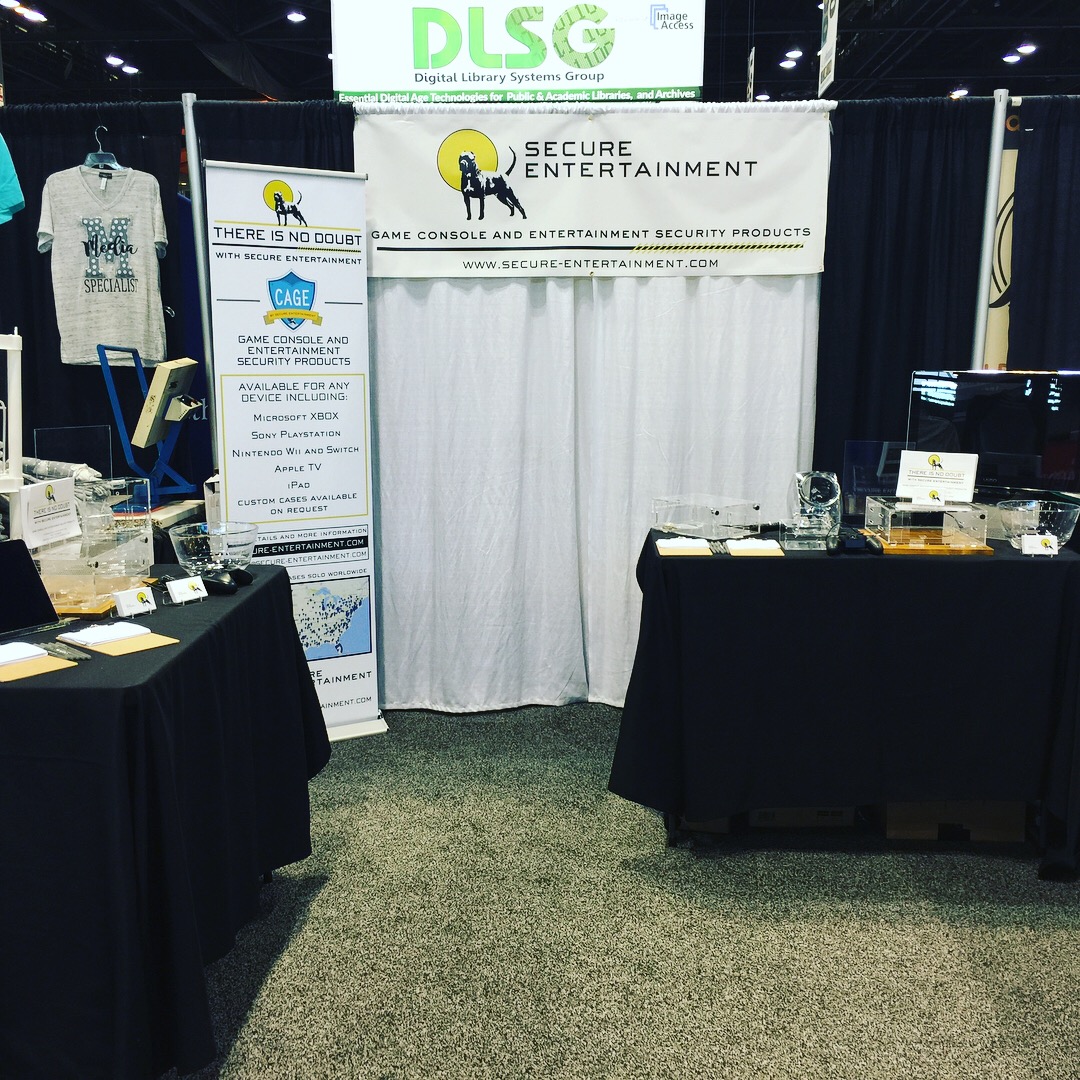
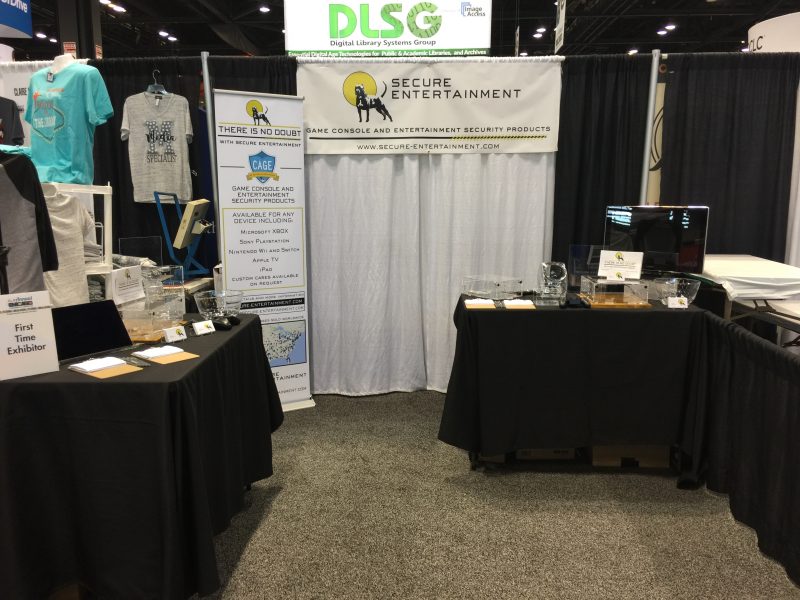
THANK YOU ALA!

ALA Booth 3

ALA 2017 Booth
Secure Entertainment’s booth at ALA!

The ALA  2017 conference in Chicago this year was our first venture into the conference life. We wanted to thank all those that stopped by and gave us a moment of their time to hear about the exciting products we are making. It was truly a fun and memorable experience.

Posted on

Gaming Console Security for Libraries

Gaming Console Security for Libraries | Secure Entertainment
Solutions for Libraries

Gaming draws patrons in. The right security keeps the hardware there.

Libraries have always evolved with the communities they serve. Game rooms and console lending programs are drawing in teenagers, young adults, and families who may not have visited otherwise, and the data shows that increased foot traffic translates directly to increased book circulation. The challenge is protecting the equipment in open, public-access spaces where anyone can walk in.

Why libraries are adding gaming programs

15–20%
Increase in book circulation at libraries that add gaming programs, as patrons who come for games stay longer and engage with other resources.
Sandy Farmer, Houston Public Library, as reported by NPR

The American Library Association (ALA) has recognized gaming as a key avenue for reaching underserved patron groups, describing gaming services as epitomizing the “library as third place” — a community gathering spot between home and school or work that encourages play, socialization, and cultural enrichment. Families come together: parents use computers and other library resources while their children engage in supervised gaming, turning a single-purpose visit into a multi-hour community experience.

As one librarian put it: “I have a room full of teenage boys that are happy, and the library is the coolest place they know.”

The proven benefits of library gaming

Draw teens and their parents

Gaming events attract younger patrons who may not have otherwise visited, increasing overall circulation and engagement across all age groups.

Build staff-patron relationships

Teens are more likely to ask for help from library staff they know personally. Game nights create natural, low-pressure opportunities for connection.

Develop real skills

Many libraries involve teens in planning and running game nights, selecting titles, marketing events, setting up equipment, and enforcing time limits.

Support cognitive development

Research suggests well-designed games improve fluid intelligence and the ability to solve complex, multifaceted problems, a growing area of educational study.

Encourage teamwork

Multiplayer games require communication, strategy, and cooperative problem-solving, skills that transfer directly to academic and social settings.

Expand media literacy

Video games are a form of storytelling and information. Incorporating them reflects libraries’ mission to offer cultural, recreational, and educational materials in all formats.

“Your Cages for the Xbox and PlayStation are absolutely marvelous! Our game room is a great outlet for our students, and they love playing video games. They have lasted well, are strong, and we have never had a theft problem thanks to the CAGE products.” Shoreline Community College — Seattle, Washington

Resources for libraries considering gaming programs

Keeping consoles secure in a library

One of the biggest practical challenges for any library setting up a public game room is protecting the equipment. Consoles like the PlayStation 5, Xbox Series X, and Nintendo Switch represent significant investments, and in open, high-traffic environments, theft and tampering are real concerns. Without physical security, libraries face the same hardware replacement cycle that eats into already limited budgets:

Controllers
$70–$80 each, most commonly lost in public library settings
Consoles
$400–$500 each, targeted in low-supervision open-access areas
Tampering
Unauthorized account changes or downloads that disrupt shared patron use

Our CAGE™ security cases and patented controller tethers are specifically designed for public and institutional environments. They allow full console functionality, including ventilation, port access, and controller use, while preventing unauthorized removal or tampering. Libraries, schools, and community centers across North America trust our products to keep their game rooms running safely.

Best for family & youth programs
Nintendo Switch Security

Intuitive controls and family-friendly games make the Switch the most accessible console for all-ages library gaming. Best used docked and secured to a surface.

Best for broad game library
Xbox Series S Security Setup

Game Pass gives access to hundreds of titles without individual purchases, extremely cost-effective for libraries that want variety without a large game budget.

PlayStation
PS5 Security Setup

Strong single-player and story-driven library, well-recognized brand. Pair with a controller tether to keep DualSense controllers at the station.

Multi-station & volume
Equipping multiple stations?

We offer volume pricing for libraries setting up several stations. Use our console security lookup to confirm the right case for each model, then contact us to discuss quantities.

The cost of not securing it

Library budgets are limited. Every stolen or damaged console comes out of funds that could go toward programming, collections, or staff. Here is the math on a single Xbox Series S station, a popular library choice, over one year assuming one console and two controllers lost:

Unsecured: one year of losses
Replacement console$299
Replacement controllers (2)$120
Staff time & program downtimeOngoing
First-year loss $419+
Secured once
Xbox Series S Security Case$129.99
Xbox Controller Tether$49.95
Replacements needed$0
One-time cost $179.94
Save $230+ in the first year
and the station stays protected for every patron after, at no additional cost

Xbox Series S retail price approximately $299. Controller costs based on typical 2026 retail pricing. Product prices as listed on our store. Confirm current prices before purchase.

How to set it up

1
Find the right case

Use our console security lookup tool to confirm the correct case for your exact console model. Cases ship within 2–3 business days.

2
Mount and lock

Install the CAGE™ case with four standard Phillips-head wood screws to a shelf or surface. See our installation guides for each model. No special tools required.

3
Attach controller tethers

The controller bracket installs with a tamper-resistant screw (included bit provided). Route the 10ft USB cable for continuous charging. No ongoing staff supervision required.

We also help with

Ready to secure your library’s game room?

Secure Entertainment has been protecting public gaming equipment for over 15 years. We work directly with institutions and can accommodate purchase orders.

Posted on

Esports Facility Security for Colleges & Universities

Esports Facility Security for Colleges & Universities | Secure Entertainment
Solutions for Esports Programs & College Facilities

Collegiate esports is a full academic institution now. Protect the hardware that powers it.

What started with a handful of programs has grown into one of the fastest-growing segments of higher education, with over 280 college programs, $50 million in scholarships, and dedicated degree pathways. But building and running an esports facility means protecting expensive, shared hardware from theft and damage every day. Here is what the programs look like, and how to keep your facility’s equipment secure.

The growth of collegiate esports

280+
Colleges & universities in NACE, up 60% from 175 in 2022
15,000+
Student-athletes supported across collegiate esports programs
$50M
In annual esports scholarships projected for the 2025–2026 academic year
78%+
Graduate job placement rate for esports program graduates

This is not a passing trend. Programs now span community colleges, regional universities, and major research institutions, creating competitive opportunities for students at every level. Idaho State University broke ground on a new $520,000 esports arena in fall 2025. The National Association of Collegiate Esports (NACE) is the primary governing body and publishes regular data on program growth, scholarships, and participation.

Scholarships and career pathways

The average esports scholarship ranges from $1,000 to $6,000 per year, with elite programs offering full-ride packages. Institutions like Harrisburg University offer top recruits up to $19,000 per year. The career pipeline emerging from these programs spans far more than professional gaming:

Tournament operations

Event management, broadcast coordination, and live production for competitive gaming events at every level.

Game development & design

Engineering, design, and narrative roles at game studios, with esports programs feeding talent directly into the industry.

Content & broadcast

Streaming, commentary, social media management, and video production — one of the fastest-growing career categories in the esports ecosystem.

Esports marketing & sponsorship

Brand partnerships, digital marketing, and fan engagement roles as major brands increase investment in competitive gaming.

Facility & program management

Coaching, program administration, and facility operations roles that are growing alongside the number of programs themselves.

Dedicated degree programs

Shenandoah University, Boise State, Oklahoma State, Full Sail, and others now offer dedicated degrees in esports management alongside their competitive programs.

Where esports hardware lives on campus

Dedicated esports arenas

State-of-the-art facilities purpose-built for competitive play, practice, and streaming. These represent the largest hardware investments and the highest-profile security requirements.

Student union gaming rooms

Publicly accessible gaming areas in student centers and unions. High-traffic, minimal overnight supervision, and one of the most common environments for controller and console theft.

Recreation centers

Gaming stations alongside traditional rec equipment. Open-access environments where consoles serve a wide and rotating population of students throughout the day.

Residence hall lounges

Shared gaming in dorms and apartment-style residence halls. Limited staff presence overnight makes physical security the primary protection layer.

The hardware security challenge

Building an esports program means more than recruiting talented players. It means equipping and protecting facilities that hold up to heavy daily use by hundreds of students, often in shared, public-facing spaces where anyone can walk in. Without proper security, programs face replacement costs that hit already tight budgets, and missing equipment takes stations offline when students need them.

Controllers
$70–$80 each to replace, easiest item to pocket in a shared facility
Consoles
$400–$500 each, targeted for resale value in open-access spaces
Tampering
Unauthorized account changes, downloads, or accessory swaps that disrupt the facility

Security products for esports facilities

Secure Entertainment has been designing anti-theft security hardware for institutional gaming environments for over 15 years, covered under US Patent 11,103,796. Every product lets students game normally while giving facility managers the confidence that hardware stays where it belongs. These are the products most commonly deployed in collegiate esports facilities:

PlayStation
PS5 Security Setup

The most common console in competitive esports programs. Crystal-clear CAGE case plus controller tether keeps both the console and DualSense locked to the station.

Xbox
Xbox Series X/S Security Setup

Game Pass provides hundreds of titles without individual purchases, ideal for facilities that need a broad rotating library for open-access gaming rooms.

Nintendo
Nintendo Switch Security

Ideal for student lounges and recreation center game rooms alongside competitive setups. Family-friendly titles make it accessible to a wider student population.

Multi-station setups
Volume pricing available

Equipping a full esports room or multiple stations across your campus? We offer volume pricing for multi-unit orders. Contact us to discuss quantities and configuration.

The cost of not securing it

An esports program operating on a university budget cannot absorb repeated hardware replacement. Here is the math on a single PS5 station over one year, assuming one console and two controllers lost:

Unsecured: one year of losses
Replacement console$499
Replacement controllers (2)$150
Station offline during replacementOngoing
First-year loss $649+
Secured once
PS5 CAGE™ Security Case$139.99
PS5 Controller Tether$49.95
Replacements needed$0
One-time cost $189.94
Save $450+ per station in the first year
multiply that across a multi-station facility and the case for security hardware writes itself

Replacement costs based on typical 2026 retail pricing. Product prices as listed on our store. Confirm current prices before purchase. Volume pricing available for multi-unit orders.

How to set up a secured esports station

1
Confirm your models

Use our console security lookup tool to match the exact case to your console model. Each case is purpose-built for a specific system. Cases ship within 2–3 business days.

2
Mount the case

Install the CAGE™ case with four standard Phillips-head wood screws to a desk, shelving unit, or wall-mounted surface. See our installation guides for each model. No special tools required.

3
Attach controller tethers

The controller bracket installs with a tamper-resistant screw (included bit provided). Route the 10ft cable for continuous charging. Students can game at full range of motion without removing the tether.

We also help with

Setting up an esports space on campus?

We have worked with programs of all sizes and can recommend the right products for your specific facility. We work directly with institutions and can accommodate purchase orders.